Passive Ambient Input

I realized today that in almost all cases, the sort of ring I want my cell phone to use is related to the ambient noise in the room. If I’m in a quiet place, I want my phone to just vibrate, or ring very very quietly. If I’m in a club or a wedding reception, I not only want it to ring loudly, but I want it to vibrate too in case I can’t hear the ring. Medium noise levels usually call for medium-level rings. You get the idea. The problem is that I rarely remember to change my ring volume when I go from place to place. So I either miss a call because I couldn’t hear the phone ring, or I get embarrassed when it rings in church or something.

The phone could certainly combine this with factors like time of day, ambient light, and other pieces of data to make an even more intelligent decision. For instance, it’s really quiet while I’m sleeping, but it’s also dark and it’s also 3am. So just let me sleep.

Of course, the phone should have a way to change this, customize it, or override it, but I think overall it would be a really useful feature if it was done in an intelligent way.

Danbury Mint

Generally, Steph and I are very negative and snobbish about kitch. It’s not that we hate the people who buy it. We just don’t get into it. We’re not excited about garden gnomes or dogs playing poker.

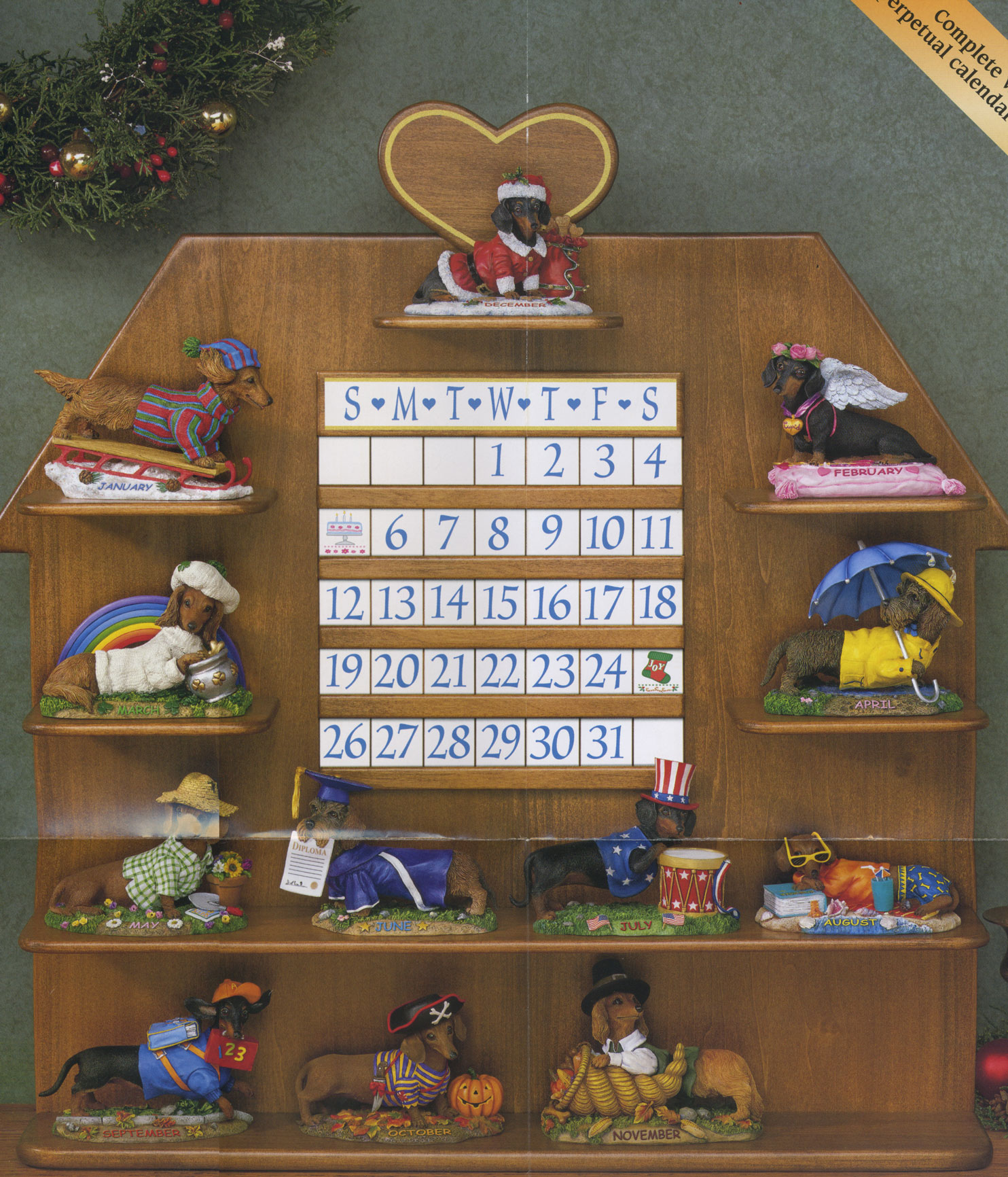
But there’s one notable exception to this rule, and that’s the Dachshund Collection at the Danbury Mint. Somehow, at some point, we were added to their mailing list for Dachshund memorabilia, and they send us an ad with a large glossy photo of their latest craptacular masterpiece every single month. We would never actually buy any of this. I’m hoping no one misunderstands this entry as an invitation to send us small pieces of dachshund-shaped porcelain that we need to regularly dust. That’s not where I’m going here.

Having said that, whenever I see that envelope with the Danbury Mint return address, I get a little excited. Today I clapped my hands. I really wanted to see what they’d come up with next, and I wasn’t disappointed when my eyes gazed upon The Dachshund Calendar. Peep that sucker. Pardon the crudity of the stitched-together scan, but the biggest one on the web was only 400 pixels tall, and that just won’t do when you’ve got an 11″ x 13″ glossy in front of you and you know the splendor people are missing.

Steph’s favorite is September, whereas I’m a sucker for February. I think it’s the wings.

Why do I get the feeling that this experience could teach me something about being a parent?

Cross-country Movie Watching

I want a device that allows me to watch any movie of my choosing with friends who aren’t in the room with me. We’d all watch the movie at the same time and this device would keep the movie in sync across all our players (e.g. pausing or fast forwarding in one place would do it everywhere), and it would also allow us all to hear each other talking while we watch. That way, I could invite friends from across the country to sit down and catch a flick with me even if we can’t be together in person.

There are low-tech ways of doing this. They all suck.

Get Your Mii

Since posting my Mii desktops, I’ve had a few people ask how I captured them in such pure, gigantic glory. (The Flickr photos I posted earlier can’t do justice to the original sizes.)

Most people who want to capture their Miis on their computer just take a digital camera and point it at their TV, hoping for the best. You don’t have to recreate your Mii to use this process, but it comes out looking pixely, dingy, and grey. TVs don’t photograph well.

A few others go a slightly smarter route and take a screenshot of a Mii editor site. This allows for a cleaner, 100% digital process, but it forces you to re-create your Mii a second time by hand. You might not get it quite right if you’re not careful, and if the online editor you use isn’t very good, it’ll introduce further errors and you won’t get the look you’re expecting.

I’ve found a good compromise between these two processes. Doing it this way, you’ll get the pure-digital cleanliness of the online editor without all the error-prone recreation. Some of the Mii heads I’ve captured this way are 850 pixels tall, which is easily high-res enough to allow for Photoshop fun, screensavers, and other cool stuff. Here’s how it’s done. I’m looking forward to someone finding a better way to do this (most likely a Flash hacker), but for now, this works well. This process is tailored for Macs and Mac OS X, so if you’re on a PC you’ll have to improvise some of this

You’ll need:

  • A Nintendo Wii with your desired Miis on it
  • A Mac with Bluetooth capabilities
  • Mii Transfer
  • The “full screen” version of Mii Editor, found here

The steps:

  1. Transfer your desired Miis to one of your Wii Remotes in Mii Plaza (Refer to Nintendo’s documentation on how this is done.)
  2. Fire up Mii Transfer and pair that remote to your Mac using the on-screen instructions. If it fails, just try it again. Mii Transfer only came out 8 days ago, so it’s not perfect yet, but I’ve had great success with it.
  3. Save your desired Miis to your Mac, one “slot” at a time. They’ll be saved as special binary “.mii” files
  4. For each Mii you want to capture, go to the full-screen Mii editor and click “File” and then “Load”. Select your “.mii” file and click OK. Your Mii will appear on the page.
  5. Optional, but nice: right-click (or control-click) the Mii Editor and select “Play”. This will get rid of unwanted interface elements in the Mii editor that may interfere with your screenshot, or with Miis who have larger hair
  6. Right-click (or control-click) the Mii Editor and select “Zoom In.” Repeat this until the Mii head fills your screen without being chopped off at the edges. (For me, this was only one zoom.) If you go too far, just zoom out. People with larger monitors will get better results.
  7. Take a screenshot! I prefer to use Command-Shift-4 and hold down Control to capture the Mii to my clipboard, but whatever works for you is fine.
  8. Bring your Mii into Photoshop or your image editor of choice, use the Magic Wand or equivalent tool to remove the background from the image, and crop the image so it only contains your Mii head.

There you go! A nice, gigantic Mii head that can be edited, played with, resized, dropped onto any background, or even dropped into family photos for a surreal kick. Try ’em on your next Christmas Card! Dang… I’m going to do that.

Enjoy, and don’t forget to digg it.


Get Your Music on iTunes

I wasn’t aware of this at the time or I would’ve blogged it, but in early 2006 a service called TuneCore launched. This service will take original music you’ve written and recorded and publish it on iTunes for you. (They’ll publish to other online music stores too.) The service costs the artist a paltry amount when compared to the benefits of exposing their music to millions of people. This kind of availability is approximately equivalent to having your CD in Target, right there on a shelf. This is a huge deal for independent artists.

The best part of the whole deal is that the owner of the music keeps 100% of the profits that come from the sales of their music. They don’t have a giant record label on their back, stealing the dollars right out of their hands as they earn them. The artist just has to sell approximately two copies of their album to pay for the cost of getting it in the iTunes store, and the rest is pure profit. You can’t lose!

So if you’ve been thinking of becoming a famous musician, but haven’t been able to get your music into the hands of a wide-enough audience, you just lost your last excuse. According to the data Steve Jobs gave in his most-recent keynote, iTunes sales averaged just under 3.3 million songs per day in 2006. If you got just 1% of one day’s total sales for only one of your songs, that’d be $33,000. Well, okay, it’d be $32,670, but you get the picture. And you’d have paid $11.96 to get that song on iTunes. That’s what I call a good opportunity.

Go write something catchy.


Mii Desktops

I discovered a few tools and a couple brain-dead hacks via which I could get my Miis onto my Mac. After that, I just did what came naturally: desktops!

I may post a how-to on this soon, since I think people will be interested to see how it’s done. Hopefully I’ll have time to post it this weekend. If we could get a flash hacker or two on this thing, we could do some seriously cool stuff. Until then, enjoy.

JL! Mii

Steph Mii

Steve Mii

Pride and Joy Designs

Hey all! I just realized that I never told you all about prideandjoydesigns.com. My sister approached me quite awhile ago and said she’d like to start selling her hand-made jewelry online. She knew I made websites, and wondered if I could whip something up for her. I took my sweet time, I admit it, but last November I finished it up. I think it turned out pretty well.

Check it out, and buy some jewelry there if you’re ever in need of a beautiful bracelet, earrings, or just about any custom piece you can think of. Hey, Mother’s Day is only two months away. Seriously, you can’t go wrong here. Those crystals are gorgeous.